Mezzo
Mezzo is REST API mocking library powered by Express.
It has the following
- Web UI interface for manual testing/debugging
- Variants: swap responses for REST API
- Test Reuse: Execute the same test against mock or live servcie.
- Parallel sessions: Support for single instance mock server for parallel processes.
- Support for all file types: Auto evaluation of response file extension and mime type
- Platform independent mocks: Mock any service irrespective of the language it is written in.
- Server states: Ability to mock server state.
- Manual tests: Ability to run tests manually against mock service
- Service Faults: Team can simulate service faults deterministically.
And on roadmap
- Swagger integration: automatic mock creator for web-services with swagger definition.
- Drop and respond: respond with a JSON file based on the route path automatically by dropping a repsonse file in the folder.
- Share Mock data: Allows fetching of mocked data and routes from multiple Git repositories — allowing teams to share their mocked responses.
- Dynamic Transposition of Mock Data (JSON): Ability to modify response on the fly.
Admin UI
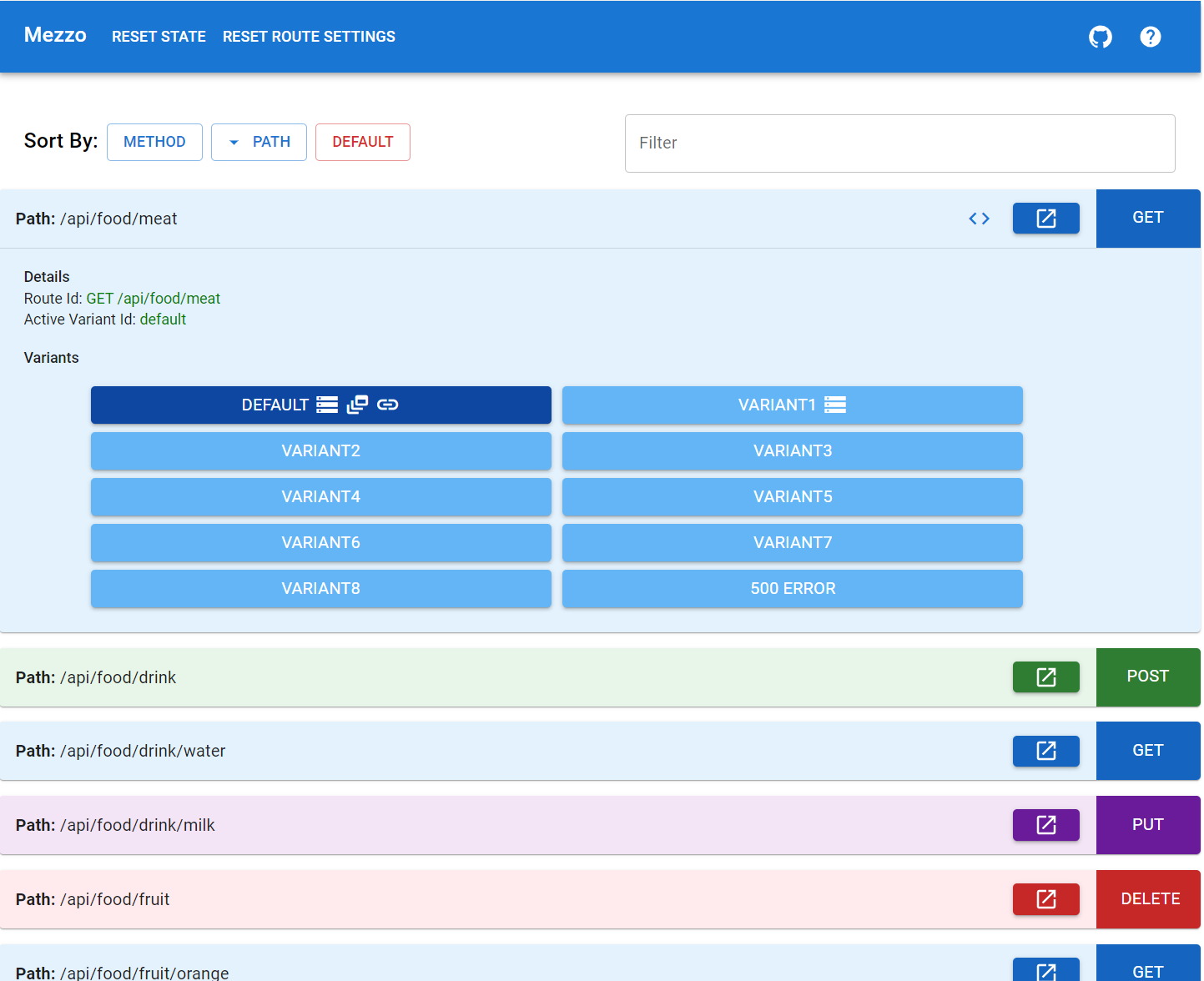
The admin UI at http://localhost:8000/mezzo is great if using this locally to set routes and variants in global scope. It has a handy GUI to set variants, make requests, and view responses.
Getting Started
import mezzo from `@caribou-crew/mezzo-core`;

// start your mezzo server
await mezzo.start({
  port: 8000,
  mockedDirectory
});

// add your mocks
mezzo
  .route({
    id: 'GET /route1',
    path: '/route1',
    callback: (req, res, route) => {
      res.json({ someKey: 'A' });
    },
  })
Variants
Variants let you setup alternate responses to your routes.
someRoute.variant({
  id: 'variantId1',
  callback: (req, res) => {
      res.json({ someKey: 'B' });
  },
})
Routes are just Express routes
Anything you can do in express, you can do here
mezzo
  .route({
    id: 'GET /route1',
    path: '/route1',
    callback: async (req, res, route) => {
      await new Promise((resolve) => setTimeout(resolve, 1000)); // Or make a network call
      res.json({ someKey: 'A' });
    },
  })
Handy utils to return files
Given you’ve started the mock server with the directory mocked-data
await mezzo.start({
  mockedDirectory: 'mocked-data',
});
and given the following directories
- mocked-data/respondWithJSONFile/GET/default.json
- mocked-data/respondWithTextFile/GET/default.txt
You can use mezzo.util.respondWithFile to return static content
mezzo
  .route({
    id: 'GET /respondWithJSONFile',
    path: '/respondWithJSONFile',
    callback: async (req, res, route) => {
      mezzo.util.respondWithFile(route, req, res);
    },
  });

mezzo
  .route({
    id: 'GET /respondWithTextFile',
    path: '/respondWithTextFile',
    callback: async (req, res, route) => {
      mezzo.util.respondWithFile(route, req, res);
    },
  })
Note that respondWithFile simply scans the directory for known file types (txt, html, png, gif, pdf, jpg, jpeg, svg). Note the file names mirror the variant names. So a default setup + variantId1 should involve default.json and variantId1.json (or any supported extension).
Set variant for route
The active variant can be selected via Admin UI at http://localhost:8000/mezzo by clicking on the desired variant button.
Variants can also be set programmatically.
await mezzo.setMockVariant({ [routeId]: 'variantId1' });
Sessions
When mezzo has multiple simultaneous consumers there is often a need for “sessions” to scope variants to specific consumers. For example given 2 consumers, it’s possible they want different variants for the same API at the same time.
This can be solved by using sessions. As a consumer you can pass a session ID x-request-session in the request header and out of the box all responses will be the default variant unless set otherwise and scoped to this session ID. Session ID can be any string.
Set/Update session variant
The admin UI is not currently supported for multiple concurrent sessions but there are some utility methods.
mezzo.setMockVariantForSession and mezzo.updateMockVariantForSession can be used to change variants for a specified session ID.
set will leave all variants in a default state that are not part of the setMockVariantForSession call, updateMockVariantForSession only changes the variants specified.
Examples
All routes except for route1 and route2 will be set to default variants.
await mezzo.setMockVariantForSession(sessionId, {
  [route1]: variant1,
  [route2]: variant2,
});
and
route1 and route2 variants will be updated, all other routes will be whatever they were previously set to.
await mezzo.updateMockVariantForSession(sessionId, {
  [route1]: variant1,
  [route2]: variant2,
});
Get custom variant despite not being set
If you want to receive a specified variant without changing the route state simply add the x-request-variant header with the desired variant ID for the rouet you’re requesting.
Headers
Per the prior sections, x-request-variant and x-request-session can be used to drive different behavior.
Hosting remotely
At the end of the day this is a node API that can be hosted anywhere node runs. A typical use case is to host remotely and have multiple consumers connect each defining their own session ID using variants to drive deterministic behavior.
Profiles
Profiles are a premutation of pre-selected variants. The simplest way to get started is the web admin page on the profiles tab. You can configure the permutation of desired variants and save the profile locally (to browser’s local storage), or “remotely” (a code snippet will be generated you can check in to source control so that anyone with the code can reference it).
Icons
You can add titleIcons to a route menu item or icons to a specific variant button. Any icons listed on gogle font icons can be used.
Example
const dynamicFeed = { name: 'dynamic_feed' };
const link = { name: 'link' };
const database = { name: 'storage' };
mezzo
  .route({
    id: 'GET /api/food/meat',
    path: '/api/food/meat',
    titleIcons: [ // this shows an icon in the route item even when collapsed
      {
        name: 'code',
        link: 'https://github.com/caribou-crew/mezzo',
      },
    ],
    icons: [database, dynamicFeed, link], // these icons appear on the specific variant button when the route is expanded, in this case the default button
    callback: function (req, res) {
      res.json({ someKey: 'A' });
    },
  })
Redirects
If you want endpoint A to map to redirect to endpoint B you can use this code snippet
mezzo.redirect(`/oldPath`, `/newPath`)